

まず、作者のパネルと完全なスクリプトを組み立てて、長尺の録画をすぐに使えるティーザーに変換します。この実践的なアプローチはユーザーにとって簡単で、色、ムード、ペースを最初から処理する具体的な制作ワークフローを確立します。
レビュー段階では、カラーパレットでムードをマッピングし、スクリプトに対してボイスオーバーオプションをテストします。適切に選択されたカラースキームは望ましいドラマを反映すべきです。ムードは、作者の意図によってオープンに傾く可能性があります。システムは複数のトラックを処理し、迅速な配信のための説得力のあるペースを作成します。
数時間分の素材を数回のクリックで開始できるシーケンスに変換するために、このセットアップは最小限の手動介入で30〜60秒のカットを作成します。制作チームにとって、自動化は繰り返しのタスクのクリックと処理を削減し、エディターは物語の明確さに集中できます。
映画から抽出された入力については、権利を保護し、アウトレット間での衝突を回避しながら、際立った瞬間を優先するポリシーを確立します。パネルは単一のスクリプトに署名でき、結果のカットは一貫したカラーとムードで完全なアークを保持します。
価値を最大化するために、パネルレビューと公開準備完了バンドルでベンチマークし、数回のクリックで済みます。このオープンなプロセスは、データ駆動型のシグナルを使用して、各ティーザーをプラットフォームの動作とオーディエンスセグメントに合わせて調整し、作者の関与と説明責任を維持します。
ユーザー主導の洗練により、長尺映像をカスタムトレーラーに変換するための詳細なワークフロー
推奨:長尺素材をストーリー、葛藤、ボイスの準備完了にタグ付けして、プレミアムライブラリを構築します。最初のパスを使用してブロックにタグを付け、次にFilmoraまたはFilmorasで自動生成ベースを駆動してYouTubeに3分間のカットを生成し、洗練されたものを迅速なテストに備えます。
検出は物語の骨格をマッピングします:オープニングフック、中間点のひねり、クライマックスのビート、静かなボイスオーバーセグメント。これらのブロックにメタデータを添付することで、エディターチームはそれらを迅速に再結合でき、各シーンがストーリーアークに役立ち、意図されたスタイルに一致することを確認できます。
編集ワークフロー:エディターで、ブロックを選択してスライドショースタイルのタイムラインに配置します。複数のスタイル(シネマティック、ドキュメンタリー、プロモ)を試して、レビュー用に完全なバージョンを保持します。自動生成を使用して、均一なペースのバリアントを生成し、結果を並べて比較して最適なものを選びます。
ユーザー主導の洗練:ストーリーの一貫性を維持しながら、ペース、長さ(長いバージョンを含む)、ボイスレベルを微調整します。葛藤ビートを解決し、第一印象が魅力的であることを確認します。次にモンタージュをロックし、オーバーレイ、テキスト、プロモを追加します。
出力オプションはリーチを最大化します:YouTubeやソーシャルメディア用のプロモカットを生成します。さまざまなトーン、スタイル、ターゲットオーディエンスに合わせたフルスイートを提供します。3分形式がしばしば勝者ですが、保持率をテストし、さまざまな映画スタイルのローンチやスライドショーバリアントをサポートするために、より長く、より短いイテレーションを提供します。
競争上の優位性:競合他社の再利用を監視し、高度なカスタムパイプラインで先を行きましょう。イントロ、アウトロ、トランジションの強力なライブラリを維持します。自動生成に頼って迅速にイテレーションし、出力がスタイルとオーディエンスへのマッチと一致するまで洗練します。結果を追跡していれば、より速くイテレーションし、映画の作業を魅力的に保ちながら、効果的なプロモを提供できます。
トレーラー抽出のための最小解像度、フレームレート、および期間要件:入力制約
ベースラインの推奨:ソース映像は1280x720以上、24〜30フレーム/秒、最小長さ60秒とし、まとまりのあるトレーラーを生成するために十分なシーンを確保します。
より高品質の場合は、1920x1080(30fps)を優先します。素材が60fpsで届く場合は、30fpsにダウンサンプリングします。カラースペースを維持し、H.264またはHEVCでエンコードします。1080pの場合は5〜12Mbps、ソースライブラリが対応している場合は2Kの場合は12〜20Mbpsをターゲットビットレートとします。
ワークフロー内では、会話とドラマチックなビートの検出が選択を推進します。文字起こしを使用して重要な瞬間を特定でき、あらすじ生成は単純なカットリストを超えて物語のアークを構造化するのに役立ちます。画像フレームは6〜8秒のウィンドウでサンプリングされ、トランジションがスムーズであることを保証します。候補をオープンタグライブラリに保存することで、時間のかかる手動レビューを最小限に抑えながら、ショートフォームアセットまたはサムネイルに時間を費やすことができます。
期間制約:最終的なトレーラーの長さは15〜60秒とし、30秒を一般的なターゲットとします。3〜5個のショートフォームシーンを目標とし、各シーンは約6〜10秒とします。ウィンドウがペースとストーリービートに一致することを確認します。インディー映画スタイルのストーリーテリングでは、トランジションをタイトに保ち、単一の瞬間を過度に引き延ばさないようにします。
実装ノート:テンプレートを使用して代替カットを自動生成します。言語オプション付きのメニューを提供します。テキスト読み上げによる複数のボイスオーバーをサポートします。ローカライズのためにボイスオーバーを分離します。画像アセット、会話のハイライト、葛藤の瞬間のライブラリを維持します。人工的な制御によりテンポが一貫して保たれます。インディークリエイターとして、ドラマチックな緊張とショートフォームストーリーテリングのバランスをとります。
シーンスコアリングとキーモーメント抽出:エンゲージメントを推進する瞬間の選択

推奨:AI搭載のスコアリングを活用して、2〜12秒のウィンドウをエンゲージメントの高い瞬間でランク付けし、次にトレーラー準備完了バンドルのトップモーメントをエクスポートします。3ステップのワークフローから始めます:シグナルを定義し、スコアを計算し、フォーマット全体で再利用可能なアセットを配信します。
- シグナルを定義し、文字起こしと整列させる:自動文字起こしを実行して会話をタイムスタンプにマッピングし、次に会話の密度、明確さ、ドラマチックな引用の存在によって瞬間をタグ付けします。これらのタグを使用して、主要なセリフをサポート的なやり取りから分離し、各瞬間が視聴者が追跡するための明確なスルーラインを持つことを保証します。ムードラベル(オープニング、エスカレーション、解決)を追跡して、後でのルックアンドフィール(見た目と雰囲気)の決定を支援します。
- 視覚的なピークと動きを検出する:動き、色のばらつき、顔の表情のピークを検出して適用します。より大きくまたはよりダイナミックなサウンドキューとペアにして、ドラマチックな変化をフラグ付けします。迅速なカットまたは強い視覚的勢いのあるブロックをエンゲージメントの高い瞬間として候補にし、候補をオープンタグライブラリに保存することで、時間のかかる手動レビューを最小限に抑えます。
- 透明で複合的なモデルでスコアリングする:エンゲージメント(視聴完了、再視聴、一時停止)、ムードシフト(ダイナミクス)、および情報量(コンテキストの明確さ)の加重合計として最終スコアを計算します。映画のコアプロミスを進め、ペースを維持する瞬間に高い重み付けを優先します。ユーザーがプロモで最良の結果を得るために重み付けを調整できるようにします。
- ターゲットプロモのためのムードとコンテキストをタグ付けする:各瞬間をムード(ドラマチック、希望に満ちた、緊張した)と物語の機能(セットアップ、展開、ペイオフ)でラベル付けします。この分離により、さまざまなトレーラーやプロモの組み立てが迅速になり、一貫性を保ちながら意図したオーディエンスに合ったルックを選択するのに役立ちます。
- エクスポートとアセットの準備:フルクリップ、高速カットモンタージュ、最小限のテキスト付き静止画スライドショーの個別の出力を作成します。字幕トラックと文字起こしベースのキャプションレイヤー、およびモバイルで読みやすいフォント前面のキャプションスタイルを生成します。ベストモーメントとダウンロードフローを開始するためのカバー画像を含む、ダウンロード可能なトレーラーパッケージを含めます。
出力戦略:ダウンロード可能またはクリエイターのワークフローに直接開くことができるマルチフォーマットアセットセットを構築します。ベストモーメントが他のプロジェクトに再利用され、わずかな編集でムードやペースを変更できるように、別々のモジュラーアプローチを使用します。最終的なルックがブランドガイドラインに準拠し、チーム間およびストーリーテリングパターンを成文化する書籍間でのアセットのオープンな交換をサポートすることを確認します。
- ステップバイステップのワークフローにより、プロセスがより迅速でエラーが発生しにくくなり、手動レビュー時間が削減され、エディターは洗練に集中できます。
- アセットには、フルモンタージュ、個々のクリップ、およびプロモ スライドショーが含まれ、それぞれに字幕トラックと一貫したフォントスタイルがあり、洗練された外観になっています。
- サポートされる形式は、放送準備完了バンドルからソーシャル対応カットまで多岐にわたり、ベストプラクティスはチームとユーザーの両方のために別のガイドに文書化されています。
- ツールとワークフローはオープンになるように設計されており、メタデータにはタイムスタンプ、静止画像、ムードタグが含まれ、将来の作成と再利用を容易にします。
実装のヒント: ウィンドウをタイトに保ち(ソーシャルプロモーションには短く、コンテキストトレーラーには長く)、時間を節約する2段階レビューを適用します。自動スコアチェックと1ページの人間による妥当性確認を含み、エンゲージメントに最適な組み合わせを見つけるためにさまざまなルックをテストします。検出データを使用して、画像と字幕の整合性を改善し、フォントと色を変更して全体的なルックアンドフィールをシャープにします。このアプローチにより、長時間のレビュープロセスが、ユーザーとプロモーションの両方に継続的で測定可能なエンゲージメント向上をもたらす迅速なパイプラインに変換されます。
スタイルテンプレートとペースプリセット:ジャンル、ブランディング、ランタイムターゲット
まずジャンルを基準にしたテンプレートを固定し、次にブランディングを重ね、厳密なランタイムターゲット(60秒)を設定して、再利用されるクリップ全体で一貫性を保ちます。
過去の資料は回顧展に適しており、学校風のフレームは教育中心のリールに権威を加えます。スクリプトとタイトルのスタイリングを維持しながら、セグメントを分離して複数の宛先に再利用できる、簡単なモジュラーデザインを使用します。
ブランディング:カラーパレット、ロゴ配置、タイポグラフィ、モーションスタイルを定義します。キューをFlexClipプロジェクトに保存します。クレジットとウォーターマークは一貫して表示される必要があります。
さまざまなソーシャルフィードに合わせてバージョンをミックスするオプションがあります。複数言語のキャプションを含め、ソースを情報過多にせずに認識するために、クレジットを最終フレームにバンドルします。
ペースプリセットは注意の瞬間にマッピングされます:フック0〜5秒、ビルド5〜20秒、ピーク20〜40秒、クロージング40〜60秒。ランタイムが長い場合は、ビルドとピークのセクションを拡張し、トランジションを維持します。疲労を避けるために、簡単なモーションアプローチを使用します。言語やソーシャル調整に合わせてカスタマイズできるカスタムセグメントもあります。最終フレームを強く保ち、視聴完了を促進し、カスタムスクリプトとアセットパックを準備して、さまざまなメディア向けに要素を分離して迅速に再構築できるようにします。
| プリセット | ジャンルの雰囲気 | ブランドキュー | ターゲットランタイム | トランジション | 特記事項 |
|---|---|---|---|---|---|
| ヒストリカルパック | 歴史的な物語 | セピア調、セリフ体タイトル、台帳クレジット | 60秒 | フェード、ページめくりモーション | タイムラインオーバーレイ、言語対応キャプション |
| エデュケーショナルブリーフ | 学術的、ドキュメンタリー | クリーンなサンセリフ体、ライトグリッド | 45〜60秒 | カット、スライド | 箇条書きハイライト、スクリプト主導のキュー |
| ソーシャルスポットライト | エネルギッシュ、若者向け | 大胆なカラーパレット、ブランドハッシュタグ | 15〜30秒 | クイックカット、ウィップパン | フック強調、字幕、CTA |
| プロダクションスナップショット | 産業プロセス | 下部サード、ロゴバンパー | 60〜75秒 | グライド、リップル | 最終フレームクレジット、ウォーターマークの一貫性 |
オーディオシェーピング:音楽キュー、ダイアログバランス、効果音同期
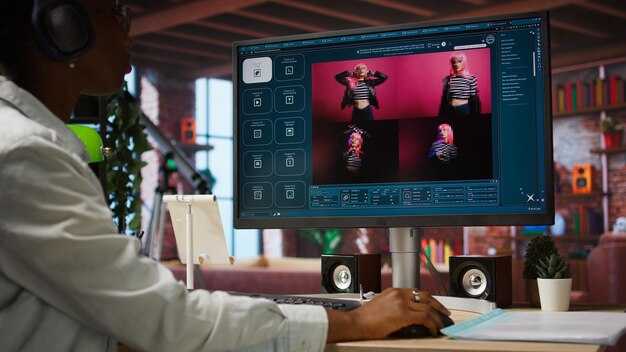
推奨:ベースラインミックスを-18 LUFS統合に設定し、ダイアログを-24 LUFS、音楽ベッドをスピーチ中に3 dBダッキングします。SFXのヘッドルームを確保するために、ピークレベルを-1 dBFS未満に保ちます。高速サイドチェーンを適用して、特にドラマチックな瞬間にラインデリバリーがクリアであることを確認します。短いテストクリップを準備し、ライブモニターとモバイルデバイスでチェックします。結果がそこで正しく聞こえ、画面以外でも視聴可能であることを確認します。この設定をFilmoraのプリセットとして保存し、将来の再利用を加速します。
音楽キューはナレーション生成を反映する必要があります。トランジションでのダイナミックなヒット、一時停止のための持続音、ドラマチックなラインでの短いスティンガー。2〜3のベッドバリエーションでコアアークを構築し、ダイアログに応答するように自動ダッキングを設定します。単一のムードという概念は忘れてください。均一なベッド以上のスタイルがあります。Filmoraを使用してスクリプトにキューをマッピングし、タイムラインにマーカーを設定して、ペースを一目で確認できるようにします。スクリプトの要約を通じて、音楽アークをプロジェクトのハイライトに合わせます。単一のムードを超えて、各ライフセグメントに合わせてスタイルを変更し、耳への負担を避けます。さまざまなリスニング設定を持つユーザーは、クリーンなミックスを維持すれば、同じ感情的なペイロードを聞くことができます。
ダイアログバランス:話者間で主要な音声が聞き取れるようにします。低域の濁りを除去するために穏やかなハイパスを適用し、サブトルのコンプレッサー(2:1)を使用して、セカンダリボイスに息をさせながらリードを安定させます。ジム、バス、または小さなスタジオにいても、リスナー全体で一貫した存在感をターゲットにします。過剰なコンプレッションはフレーズから生命を奪うので避けてください。自然なダイナミクスを保ち、呼吸を潰すのを避けてください。エディターは早い段階で相対レベルを設定する必要があります。そうしないと、ミックスが台無しになり、才能を最大限に活用できません。エディターのメーターを使用してシーン全体の平均を監視し、クリップの生命を安定させます。クリエイターにとって、この側面は生命線です。結果をそこで、より速く確認し、エディターで調整してカーブを適用できます。マーケティング目標とスクリプトに合わせた代替ダイアログプリセットをいくつか準備します。これは、学校のプロジェクトやソーシャルライフ全体での再利用に役立ち、さまざまなプラットフォームでの再利用を容易にします。分析によると、一貫したダイアログバランスは、視聴時間の増加とより強力なハイライトと相関しています。
効果音:各トランジェントをカットポイントに合わせます。正確なビートではなく、ラインの最も重要な音節を打つことに優先順位を付けます。ステップ、ドア、クリック、インパクトには正確な同期を使用します。マスキングを避けるために、SFXをダイアログに対して-6〜-12 dBに保ちます。複数の効果をレイヤーしてモーメントのライフスパンをカバーします。トランジションが自然に感じられるように、迅速なフェードイン/フェードアウトを確保します。シーケンスが繰り返される場合は、同じSFXを再利用し、リズムを維持するためにタイミングをわずかに調整します。Filmoraにワンショットの小さなライブラリを準備して、ワークフローを高速化します。これにより、ライフまたはスクールプロジェクト全体での一貫したスタイルの維持と、さまざまなプラットフォームへの再利用が容易になります。アナリストやマーケターにとって、一貫したSFXタイミングは視聴者の維持率とハイライトを高めます。重要なのは、キューを感情的なアークに明確にマッピングし、チャネル全体でアセットを生成することです。変更を適用するにはクリックし、ライブモニターでレビューしてから公開します。
洗練ループ:ライブプレビュー、フィードバックキャプチャ、反復編集
3段階の洗練ループから始めます。生成されたクリップの高速プレビュー、構造化されたユーザーフィードバック、最終エクスポート前のアスペクト、色、緊張感をタイトにするための反復編集です。
ステージ1:ライブプレビューでは、スピードコントロールとサイドバイサイド比較を使用して、意図したルックとの整合性を確保します。アスペクト比と主要シーンを維持する高速パスをレンダリングします。ReelMindsのような専用パネルを使用して、元のシーケンスと更新されたバージョンを比較し、どのセグメントが注意と維持に最も影響するかを追跡します。プレビューの長さは簡潔に保ちます。迅速な反復のために60〜90秒、ラフチェックのために2倍速オプションを使用します。
ステージ2:オンラインフィードバックキャプチャには、各シーンのタイムスタンプ付きノートと、明瞭さ、ペース、感情的な影響を評価するための簡単な投票が含まれます。トランスクリプションを生成して字幕トラックを作成し、言語全体での正確性を確認します。フィードバックはマスターログとは別に保存し、ブランドブックにマッピングして、編集がトーンとカラーの標準と一貫性を保つようにします。
ステージ3:反復編集では、各シーン内の個別のクリップに更新を適用し、色を調整し、スピードをカットし、長尺部分を要約して、緊張感を維持しながらランタイムを短縮します。各パスでクリエイターの労力を削減し、最終的な制作をスピードアップします。デルタログを維持し、変更がブランドブックとプレミアムガイドラインに準拠していることを確認して、一貫して洗練されたアセットを視聴者に提供できるようにします。
メトリクスとガードレール:最もエンゲージされたシーン、完了率、一時停止を追跡します。オンラインダッシュボードを使用して、注意が低下したときとどの言語トラックが最もパフォーマンスが良いかを示します。各サイクル後、最終制作のために最良のバリアントをロックし、ワークフローの衛生状態を維持するために残りを廃止します。




