


ابدأ بتجميع لجنة من المؤلفين ونص كامل لتحويل تسجيل ممتد إلى إعلان تشويقي جاهز للنشر. هذا النهج العملي أسهل للمستخدمين ويؤسس سير عمل إنتاجي ملموس يتعامل مع الألوان والمزاج والإيقاع منذ البداية.
في مرحلة المراجعة، قم بربط المزاج بلوحة ألوان واختبر خيارات التعليق الصوتي مقابل النص. يجب أن يعكس نظام الألوان المختار جيدًا الدراما المطلوبة؛ يمكن أن يميل المزاج نحو الانفتاح، اعتمادًا على نية المؤلفين. يتعامل النظام مع مسارات متعددة ويقوم بإنشاء إيقاع مقنع للتوزيع السريع.
لتحويل ساعات من المواد إلى تسلسل يفتح ببضع نقرات، يقوم هذا الإعداد بإنشاء مقاطع مدتها 30 إلى 60 ثانية بأقل قدر من التدخل اليدوي. بالنسبة لفرق الإنتاج، يقلل الأتمتة من النقرات ومعالجة المهام المتكررة، مما يترك المحررين أحرارًا للتركيز على وضوح السرد.
بالنسبة للمدخلات المستمدة من الأفلام، ضع سياسة تعطي الأولوية للحظات المميزة مع الحفاظ على الحقوق وتجنب النزاع عبر المنافذ. يمكن للجنة الموافقة على نص واحد والمقاطع الناتجة تحافظ على قوس كامل مع لون ومزاج متسقين.
لتعظيم القيمة، قم بالمقارنة مع مراجعة لجنة وحزم جاهزة للنشر تتطلب بضع نقرات فقط. تستخدم هذه العملية المفتوحة إشارات قائمة على البيانات لتخصيص كل إعلان تشويقي لسلوك المنصة وشرائح الجمهور، مع إبقاء المؤلفين منخرطين ومسؤولين.
سير عمل مفصل لتحويل لقطات طويلة إلى إعلانات تشويقية مخصصة مع تحسينات يحركها المستخدم
توصية: بناء مكتبة مميزة عن طريق وضع علامات على المواد الموسعة في القصة والنزاع وجاهزية الصوت. استخدم المرور الأول لوضع علامات على الكتل، ثم قم بقيادة إنشاء قاعدة تلقائية في Filmora أو Filmoras لإنتاج مقطع مدته 3 دقائق على YouTube، مع تحسينات جاهزة للاختبار السريع.
يقوم الاكتشاف برسم الهيكل السردي: الخطاف الافتتاحي، التحول في منتصف الطريق، الذروة الحاسمة، ومقاطع التعليق الصوتي الهادئة. قم بإرفاق البيانات الوصفية بهذه الكتل حتى يمكن لفريق المحررين إعادة تجميعها بسرعة، مما يضمن أن كل مشهد يخدم قوس القصة ويتوافق مع الأنماط المقصودة.
سير عمل التحرير: في المحرر، حدد الكتل وضعها في مخطط زمني بأسلوب عرض الشرائح. جرب أنماطًا متعددة (سينمائية، وثائقية، ترويجية) واحتفظ بنسخة كاملة للمراجعة. استخدم الإنشاء التلقائي لإنتاج تنويعات إيقاع متساوية، ثم قارن النتائج جنبًا إلى جنب لاختيار الأنسب.
تحسينات يحركها المستخدم: مع الحفاظ على تماسك القصة، قم بتعديل الإيقاع والطول (بما في ذلك الإصدارات الأطول) ومستويات الصوت؛ قم بحل نقاط النزاع وتأكد من أن الانطباع الأول جذاب. ثم قم بقفل المونتاج وأضف طبقات نصية وتراكبات وترويجية.
خيارات الإخراج تزيد من الوصول: إنتاج مقاطع ترويجية لـ YouTube ووسائل التواصل الاجتماعي؛ تقديم مجموعة كاملة بنغمات وأنماط مختلفة ومطابقة لنية الجمهور. غالبًا ما يفوز تنسيق 3 دقائق، ولكن قدم تكرارات أطول وأقصر لاختبار الاحتفاظ ودعم مجموعة متنوعة من عمليات إطلاق الأفلام وأنماط الشرائح.
الميزة التنافسية: راقب عمليات إعادة الاستخدام للمنافسين وابق متقدمًا بخط أنابيب مخصص ومتقدم. احتفظ بمكتبة قوية للمقدمات والخاتمات والانتقالات؛ اعتمد على الإنشاء التلقائي للتكرار السريع، ثم قم بالتحسين حتى يتوافق الإخراج مع مطابقة الأنماط والجمهور. إذا قمت بتتبع النتائج، يمكنك التكرار بشكل أسرع والحفاظ على عمل الأفلام الخاص بك جذابًا، مع تقديم عروض ترويجية فعالة.
قيود الإدخال: الحد الأدنى لدقة العرض ومعدل الإطارات ومتطلبات المدة لاستخراج المقطورات
توصية أساسية: تتطلب لقطات المصدر أن تكون بدقة 1280x720 أو أعلى، بمعدل 24-30 إطارًا في الثانية، وبحد أدنى طول 60 ثانية لضمان وجود مشاهد كافية لمقطع دعائي متماسك.
للحصول على جودة أعلى، فضل 1920x1080 بمعدل 30 إطارًا في الثانية؛ إذا وصلت المواد بمعدل 60 إطارًا في الثانية، فقم بتقليلها إلى 30؛ حافظ على مساحة الألوان وقم بتشفيرها باستخدام H.264 أو HEVC؛ استهدف معدل بت 5-12 ميجابت في الثانية بدقة 1080p، و12-20 ميجابت في الثانية لدقة 2K عندما تدعم مكتبة المصدر ذلك.
ضمن سير العمل، يؤدي اكتشاف الحوار واللحظات الدرامية إلى توجيه الاختيار؛ يمكن استخدام النسخ لتحديد اللحظات الرئيسية، ويساعد إنشاء الملخص في هيكلة القوس السردي لما هو أبعد من قائمة قص بسيطة؛ يتم أخذ عينات من إطارات الصور في نوافذ مدتها 6-8 ثوانٍ لضمان بقاء الانتقالات سلسة؛ يمكنك قضاء الوقت في الأصول قصيرة الشكل أو المصغرات التي تم إنشاؤها على فترات 2-3 ثوانٍ.
قيود المدة: يجب أن يكون طول المقطع الدعائي النهائي 15-60 ثانية، مع استهداف 30 ثانية كهدف شائع؛ استهدف 3-5 مشاهد قصيرة، كل منها حوالي 6-10 ثوانٍ؛ تأكد من أن النافذة تتوافق مع إيقاع ولحظات القصة؛ لأسلوب رواية القصص السينمائية المستقلة، حافظ على انتقالات ضيقة وتجنب إطالة أي لحظة واحدة.
ملاحظات التنفيذ: استخدم القوالب لإنشاء مقاطع بديلة تلقائيًا؛ قدم قائمة بخيارات اللغة؛ دعم التعليقات الصوتية المتعددة عبر تحويل النص إلى كلام؛ فصل التعليقات الصوتية لتوطينها؛ احتفظ بمكتبة للأصول المرئية، وإبرازات الحوار، ولحظات الصراع؛ التحكم الاصطناعي يضمن بقاء الإيقاع متسقًا؛ لديك حياة كمبدع مستقل، يوازن التوتر الدرامي مع رواية القصص قصيرة الشكل.
تقييم المشهد واستخراج اللحظات الرئيسية: اختيار اللحظات التي تقود التفاعل

توصية: اعتمد على التقييم المدعوم بالذكاء الاصطناعي لترتيب النوافذ التي تتراوح مدتها 2-12 ثانية حسب اللحظات الجذابة، ثم قم بتصدير حزمة جاهزة للمقطورات من أفضل اللحظات. ابدأ بسير عمل من 3 خطوات: تحديد الإشارات، وحساب الدرجات، وتقديم الأصول التي يمكن إعادة استخدامها عبر التنسيقات.
- تحديد الإشارات والمحاذاة مع النسخ: قم بإجراء نسخ تلقائي لرسم خرائط الحوار إلى الطوابع الزمنية، ثم قم بوضع علامات على اللحظات حسب كثافة الحوار والوضوح ووجود اقتباس درامي. استخدم هذه العلامات لفصل الخطوط الرئيسية عن التبادلات الداعمة، مما يضمن أن كل لحظة لها خط واضح للمشاهد لمتابعته. تتبع علامة مزاج (افتتاح، تصعيد، حل) للمساعدة في قرارات المظهر والشعور اللاحقة.
- اكتشاف الذروات البصرية والحركة: قم بتطبيق الكشف عن ذروات الحركة وتغير اللون وتعبيرات الوجه؛ قم بمقارنتها بإشارة صوتية أعلى أو أكثر ديناميكية لتحديد التغييرات الدرامية. قم بتوقيت الكتل ذات المقاطع السريعة أو الزخم البصري القوي كمرشحين للحظات الجذابة، وقلل من مراجعة الأيدي العاملة المستهلكة للوقت عن طريق تخزين المرشحين في مكتبة علامات مفتوحة.
- التسجيل باستخدام نموذج مركب وشفاف: احسب نتيجة نهائية كمجموع مرجح للتفاعل (المشاهدة، الإعادة، التوقفات)، وتغيير المزاج (الديناميكيات)، وغنى المعلومات (وضوح السياق). فضل الأوزان الأعلى للحظات التي تقدم وعد الفيلم الأساسي وتحافظ على الإيقاع. اسمح للمستخدمين بتعديل الأوزان للحصول على أفضل النتائج في إعلاناتهم الترويجية.
- وضع علامات المزاج والسياق للإعلانات الترويجية المستهدفة: ضع علامة على كل لحظة حسب المزاج (درامي، متفائل، متوتر) وحسب الوظيفة السردية (إعداد، تحول، مكافأة). يسمح هذا الفصل بالتجميع الأسرع للمقطورات والإعلانات الترويجية المختلفة، ويساعدك على اختيار مظهر يتناسب مع الجمهور المستهدف مع الحفاظ على التماسك.
- التصدير وإعداد الأصول: قم بإنشاء مخرجات منفصلة للمقاطع الكاملة، ومونتاج سريع القطع، وعرض شرائح للصور الثابتة مع الحد الأدنى من النص. قم بإنشاء مسارات ترجمة وطبقة تسمية توضيحية مدعومة بالنسخ، بالإضافة إلى نمط تسمية توضيحية بخط أمامي يبقى قابلاً للقراءة على الهاتف المحمول. قم بتضمين حزمة مقطورات قابلة للتنزيل مع أفضل اللحظات وصورة غلاف لفتح تدفق التنزيل.
استراتيجية الإخراج: بناء مجموعة أصول متعددة التنسيقات يمكن تنزيلها أو فتحها مباشرة في سير عمل المبدع. استخدم نهجًا منفصلاً ووحدات لتجنب تداخل التأثيرات، حيث يمكن إعادة استخدام أفضل اللحظات في مشاريع أخرى، وتغيير المزاج أو الإيقاع بتعديلات طفيفة فقط. تأكد من أن المظهر النهائي يتوافق مع إرشادات العلامة التجارية ويدعم التبادل المفتوح للأصول بين الفرق والكتب التي تدون أنماط سرد القصص.
- يحافظ سير العمل خطوة بخطوة على العملية أسرع وأقل عرضة للأخطاء، مما يقلل من وقت المراجعة اليدوية ويتيح للمحررين التركيز على التحسين.
- تشمل الأصول المونتاج الكامل والمقاطع الفردية وعرض ترويجي للشرائح، كل منها مع مسارات ترجمة ونمط خط متسق لمظهر مصقول.
- تتراوح التنسيقات المدعومة من الحزم الجاهزة للبث إلى المقاطع الجاهزة لوسائل التواصل الاجتماعي، مع توثيق أفضل الممارسات في دليل منفصل للفرق والمستخدمين على حد سواء.
- تم تصميم الأدوات وسير العمل لتكون مفتوحة، مع بيانات وصفية تلتقط الطوابع الزمنية والصور الثابتة وعلامات المزاج لتسهيل الإنشاء وإعادة الاستخدام في المستقبل.
نصائح التنفيذ: اجعل النوافذ ضيقة (أقصر للعروض الترويجية الاجتماعية، وأطول للمقطورات السياقية)، طبق مراجعة سريعة توفر الوقت من خطوتين: فحص آلي للدرجات بالإضافة إلى صفحة واحدة للمراجعة البشرية، واختبر مظاهر مختلفة للعثور على أفضل مزيج للمشاركة. استخدم بيانات الكشف لتحسين محاذاة الصورة والترجمة، ثم قم بتغيير الخطوط والألوان لشحذ المظهر والشعور العام. هذا النهج يحول عملية مراجعة طويلة إلى خط إنتاج سريع يوفر مكاسب مستمرة وقابلة للقياس في المشاركة للمستخدمين والعروض الترويجية على حد سواء.
قوالب الأنماط وإعدادات الوتيرة: الأنواع، والعلامة التجارية، وأهداف وقت التشغيل
ثبت قالبًا مثبتًا بنوع أولاً، ثم طبق العلامة التجارية، وحدد هدفًا صارمًا لوقت التشغيل (60 ثانية) للحفاظ على الاتساق عبر المقاطع المعاد استخدامها.
الإشارات التاريخية تناسب الاستعراضات؛ إطار بلهجة مدرسية يضيف سلطة للأفلام القصيرة التعليمية. استخدم تصميمًا سهلاً معياريًا يمكنه فصل الأجزاء وإعادة استخدامها لوجهات متعددة مع الحفاظ على تنسيق النص والعناوين.
العلامة التجارية: حدد لوحة الألوان، وموضع الشعار، والطباعة، وأسلوب الحركة؛ قم بتخزين الإشارات في مشاريع FlexClip؛ يجب أن تظهر الاعتمادات والعلامة المائية بشكل ثابت.
لديك خيارات لخلط إصدارات مختلفة لخلاصات إخبارية مختلفة؛ قم بتضمين تسميات توضيحية بلغات متعددة، وقم بتجميع الاعتمادات ضمن الإطار النهائي للاعتراف بالمصادر دون فوضى.
معدلات الوتيرة تتوافق مع لحظات الاهتمام: خطاف 0-5 ثوانٍ، بناء 5-20 ثانية، ذروة 20-40 ثانية، ختام 40-60 ثانية. لأوقات التشغيل الأطول، قم بتمديد أقسام البناء والذروة مع الحفاظ على الانتقالات؛ استخدم نهج حركة بسيطًا لتجنب الإرهاق. لديك أيضًا أقسام مخصصة يمكنك تكييفها مع اللغات والتعديلات الاجتماعية. حافظ على الإطار النهائي قويًا لدفع المشاهدة، وجهز نصًا مخصصًا وحزمة أصول لتتمكن من فصل العناصر وإعادة تجميعها بسرعة لمنافذ مختلفة.
| معدل | إحساس النوع | إشارات العلامة التجارية | وقت التشغيل المستهدف | انتقالات | ميزات بارزة |
|---|---|---|---|---|---|
| حزمة تاريخية | سرد تاريخي | صبغة سيبيا، عنوان نصي، اعتمادات دفتر أستاذ | 60 ثانية | تلاشي، حركة قلب صفحة | طبقات خط زمني؛ تسميات توضيحية جاهزة للغة |
| موجز تعليمي | أكاديمي، وثائقي | خط بسيط، شبكة خفيفة | 45-60 ثانية | قطع، انزلاق | نقاط بارزة؛ إشارات تعتمد على النص |
| تسليط الضوء الاجتماعي | حيوي، مناسب للشباب | لوحة ألوان جريئة، علامات تصنيف تحمل علامة تجارية | 15-30 ثانية | لقطات سريعة، دوران سريع | تركيز على الخطاف؛ ترجمات؛ دعوة للعمل |
| لقطة إنتاج | عملية صناعية | أثلاث سفلية، شعار افتتاحي | 60-75 ثانية | انزلاق، تموج | اعتمادات الإطار النهائي؛ ثبات العلامة المائية |
تشكيل الصوت: إشارات الموسيقى، توازن الحوار، وتزامن المؤثرات الصوتية
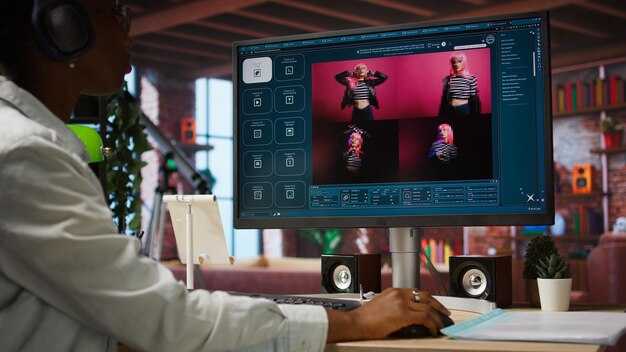
توصية: اضبط مستوى الصوت الأساسي على -18 LUFS متكامل، مع جعل الحوار عند -24 LUFS وخفت الموسيقى بمقدار 3 ديسيبل أثناء الكلام؛ حافظ على مستويات الذروة أقل من -1 ديسيبل لتوفير مساحة تأثير للمؤثرات الصوتية. قم بتطبيق تحكم جانبي سريع للحفاظ على وضوح أداء الخط، خاصة أثناء اللحظات الدرامية. جهز مقطع اختبار قصير وتحقق منه على شاشات حية وعلى جهاز محمول؛ تأكد من أن النتيجة تبدو صحيحة هناك وقابلة للمشاهدة خارج الشاشات. احفظ هذا كإعداد مسبق في Filmora لتسريع إعادة الاستخدام المستقبلية.
يجب أن تعكس إشارات الموسيقى توليد السرد: ضربات ديناميكية عند الانتقالات، نغمات مستمرة للتوقفات، ورنين قصير عند الخطوط الدرامية. قم ببناء قوس أساسي مع 2-3 أشكال مختلفة من الموسيقى الخلفية وقم بإعداد التخفيف التلقائي للرد على الحوار. انسَ فكرة مزاج واحد؛ هناك أنماط تتجاوز الموسيقى الخلفية الموحدة. استخدم Filmora لرسم الإشارات على النصوص، وجهز علامات في الخط الزمني حتى تتمكن من مشاهدة الوتيرة بنظرة سريعة. من خلال تلخيص النص، قم بمحاذاة القوس الموسيقي مع أبرز نقاط المشروع؛ بخلاف مزاج واحد، قم بتغيير الأساليب لتتناسب مع كل جزء من الحياة وتجنب إرهاق الأذنين. سيسمع المستخدمون ذوو إعدادات الاستماع المختلفة نفس الحمولة العاطفية إذا حافظت على مزيج نقي.
توازن الحوار: تأكد من بقاء الصوت الرئيسي واضحًا بين المتحدثين. قم بتطبيق مرشح ترددي عالٍ لطيف لإزالة الوحل ذي الترددات المنخفضة، وضغط رقيق (2:1) للحفاظ على ثبات الصوت الرئيسي مع السماح للأصوات الثانوية بالتنفس. استهدف وجودًا ثابتًا حتى لا تطارد التحولات اللونية؛ الهدف هو الوضوح عبر المستمعين، سواء كانوا في صالة ألعاب رياضية، أو حافلة، أو استوديو صغير. ما يجب عليك تجنبه هو الضغط المفرط الذي يسرق الحياة من العبارات؛ حافظ على الديناميكيات الطبيعية وتجنب سحق التنفس. يجب على المحرر ضبط المستويات النسبية مبكرًا؛ وإلا فقد تتعرض جودة المزيج للخطر، فأنت لا تستفيد بالكامل من الموهبة. استخدم مقياس المحرر لمراقبة المتوسط عبر المشاهد والحفاظ على استقرار حياة المقطع. بالنسبة للمبدعين، هذا الجانب حيوي؛ يمكنك مشاهدة النتائج هناك وبشكل أسرع، ثم التعديل في المحرر والنقر لتطبيق المنحنيات. جهز بعض إعدادات الحوار البديلة المتوافقة مع أهداف التسويق والنصوص؛ هذا يساعد في إعادة الاستخدام عبر المشاريع المدرسية والحياة الاجتماعية، ويجعل من السهل إعادة الاستخدام على منصات مختلفة. تظهر التحليلات أن توازن الحوار المتسق يرتبط بأوقات مشاهدة أطول وأبرز نقاط أقوى.
المؤثرات الصوتية: قم بمحاذاة كل صوت عابر مع نقاط القطع؛ امنح الأولوية لضرب أهم مقطع لفظي في السطر، وليس النبض الدقيق. استخدم تزامنًا دقيقًا للخطوات، والأبواب، والنقرات، والتأثيرات؛ حافظ على المؤثرات الصوتية عند -6 إلى -12 ديسيبل بالنسبة للحوار لتجنب التداخل. قم بتطبيق طبقات مؤثرات متعددة لتغطية عمر اللحظة؛ تأكد من تلاشي سريع للدخول والخروج حتى تبدو الانتقالات طبيعية. استخدم نهجًا لكل مقطع: إذا تكرر تسلسل، قم بإعادة استخدام نفس المؤثرات الصوتية وضبط التوقيت بجزء من الثانية للحفاظ على الإيقاع. جهز مكتبة صغيرة من المؤثرات الصوتية الفردية في Filmora لسير عمل أسرع؛ هذا يسهل الحفاظ على أسلوب متسق عبر المشاريع الحياتية أو المدرسية وإعادة الاستخدام على منصات مختلفة. بالنسبة للمحللين والمسوقين، فإن توقيت المؤثرات الصوتية المتسق يعزز تفاعل الجمهور وأبرز النقاط؛ ما يهم هو التعيين الواضح للإشارات على القوس العاطفي وتوليد الأصول عبر القنوات. انقر لتطبيق التغييرات ومراجعتها على شاشات حية، لتكون واثقًا قبل النشر.
حلقة التحسين: معاينات حية، التقاط التغذية الراجعة، وتعديلات تكرارية
ابدأ بحلقة تحسين ثلاثية المراحل: معاينات سريعة للمقاطع التي تم إنشاؤها، وتغذية راجعة منظمة من المستخدم، وتعديلات تكرارية لضبط الجانب واللون والتوتر قبل التصدير النهائي.
المرحلة 1: تستخدم المعاينات الحية التحكم في السرعة والمقارنة جنبًا إلى جنب لضمان المحاذاة مع المظهر المقصود. قم بعرض مسودات سريعة تحافظ على نسب العرض إلى الارتفاع والمشاهد الرئيسية. استخدم لوحة مخصصة مثل ReelMinds لمقارنة التسلسل الأصلي بالإصدار المحدث، وتتبع أي الأجزاء تؤثر بشكل أكبر على الاهتمام والاحتفاظ. حافظ على طول المعاينة موجزًا: 60-90 ثانية للتكرار السريع، مع خيار سرعة 2x للفحوصات التقريبية.
المرحلة 2: يتضمن التقاط التغذية الراجعة عبر الإنترنت ملاحظات مختومة بالوقت على كل مشهد، بالإضافة إلى استطلاع سريع للجمهور لتقييم الوضوح والوتيرة والتأثير العاطفي. قم بإنشاء نسخة نصية لإنتاج مسار ترجمة وضمان الدقة عبر اللغات. قم بتخزين التغذية الراجعة بشكل منفصل عن السجل الرئيسي، وقم بتعيينها إلى كتاب علامتك التجارية حتى تظل التعديلات متسقة مع معايير النبرة والألوان.
المرحلة 3: تطبق التعديلات التكرارية التحديثات على مقاطع منفصلة داخل كل مشهد، وتعديل الألوان، وسرعة القطع، وتلخيص المقاطع الطويلة للحفاظ على التوتر مع تقصير وقت التشغيل. كل مرحلة تقلل الجهد المبذول من قبل المبدعين وتسرع الإنتاج النهائي. حافظ على سجل التغييرات وتحقق من توافق التغييرات مع كتاب العلامة التجارية والإرشادات المتميزة حتى تتمكن من تقديم أصول مصقولة باستمرار للجمهور.
المقاييس والحواجز: تتبع المشاهد الأكثر تفاعلاً، ومعدلات الإكمال، والتوقفات. استخدم لوحات المعلومات عبر الإنترنت للكشف عن وقت انخفاض الاهتمام وأي مسارات لغات تحقق أداءً أفضل. بعد كل دورة، قم بتثبيت أفضل نسخة للإنتاج النهائي، وقم بإلغاء الباقي للحفاظ على نظافة سير العمل.




